¶ Introduction
The Closing Storage Entry UI is used to create a closing for storage fees related to inventory held in the warehouse. This UI enables users to calculate and document storage charges based on specific contract terms and the quantity of goods stored during a specified period. Depending on the method, storage fees are calculated based on fixed rates, daily total volumes, ending balances, or daily In & Out.
Workflow in Closing UI:
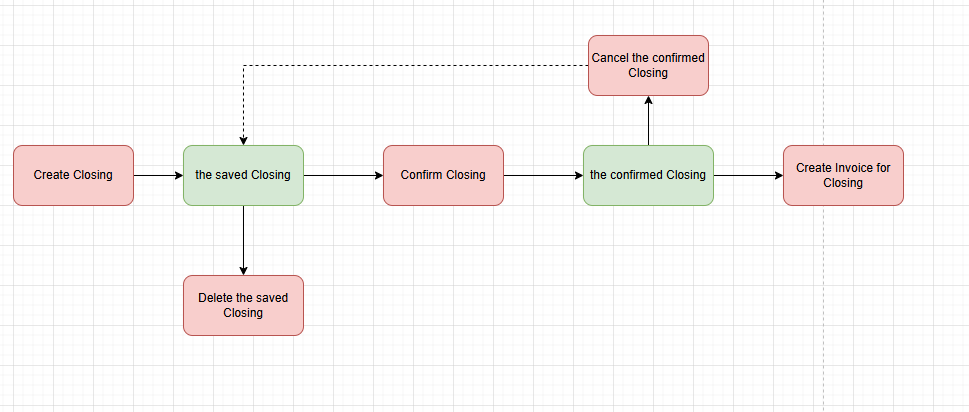
Navigation: Warehouse > Closure > Closing Storage Entry
Screenshot
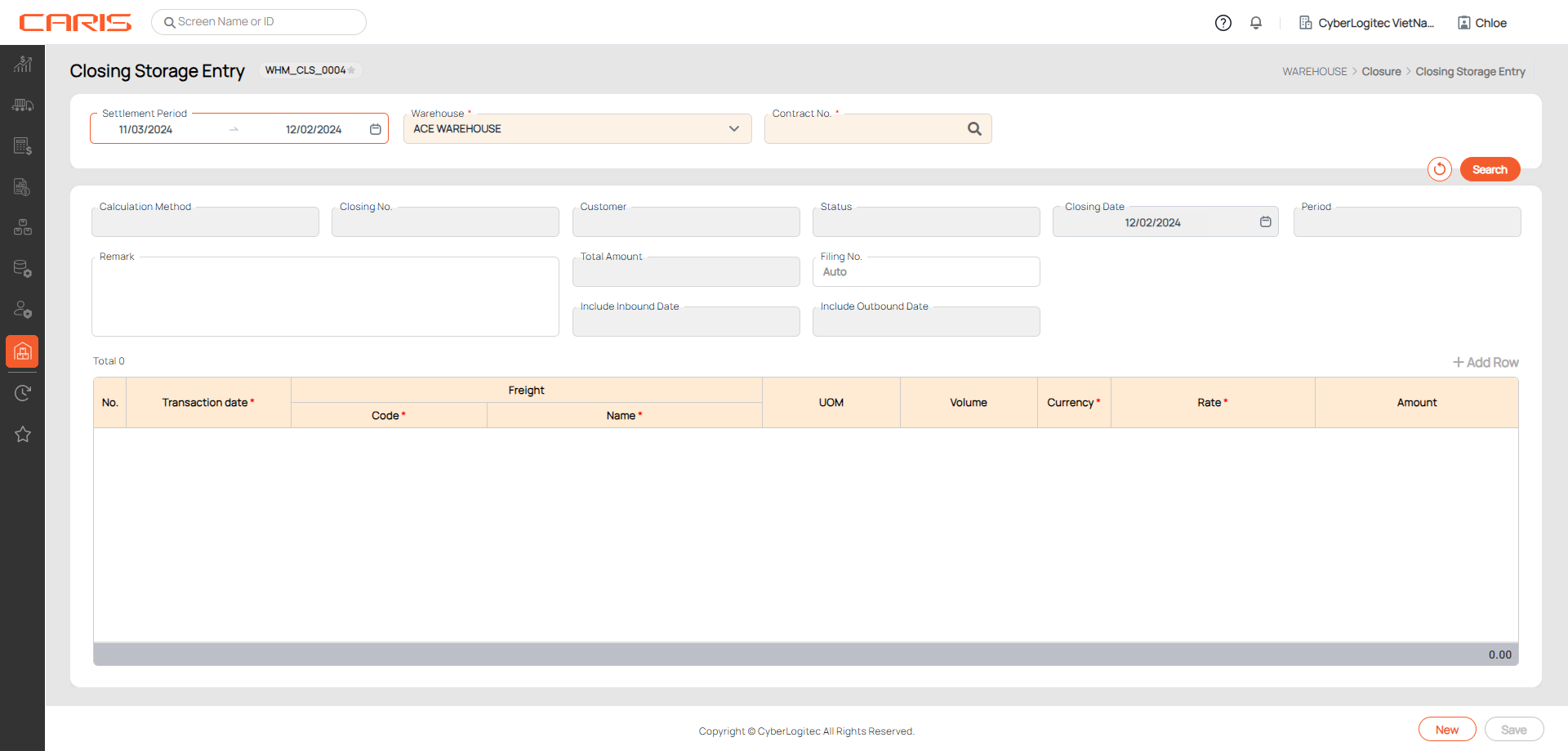
¶ Create a Closing
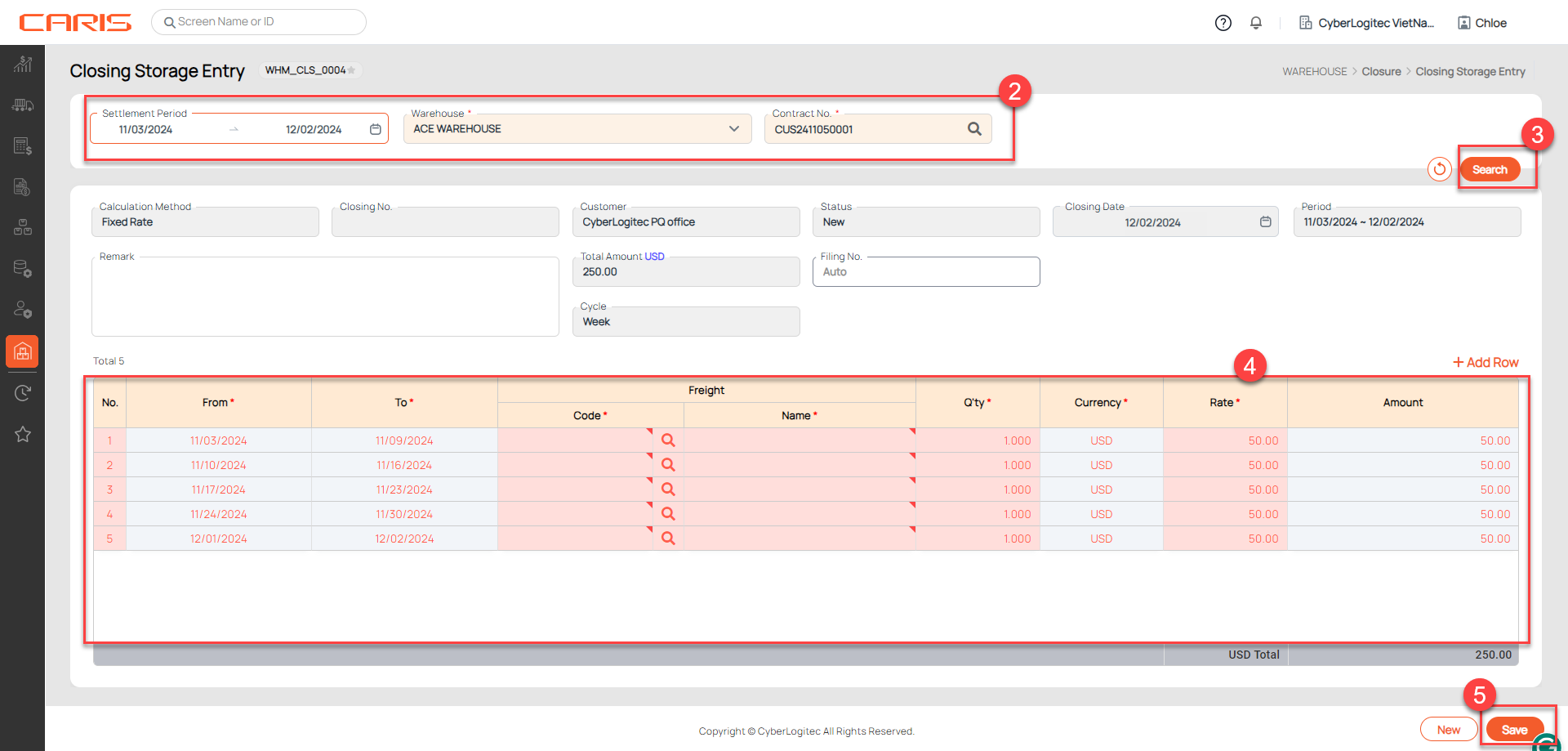
Steps to Create a Closing Storage
1. Open the Closing Storage Entry Screen
2. Fill in the necessary details to define the scope of the closing:
- Warehouse: Select the relevant warehouse for the closing.
- Contract No.: Select the relevant contract for the closing.
- Settlement Period: Specify the time range for the closing (start and end dates).
3. Click the Search button to retrieve freight
Based on the Calculation Method defined in the contract, the system retrieves freight and displays the information.
4. Complete Missing Information
5. Click the Save button to save Closing
After saving successfully:
- The status will be updated to “Saved” and Closing No. auto-generate.
- The Delete button and the Confirm button will be displayed on the screen.
Method-Specific Details:
¶ 1. Fixed Rate Calculation Method
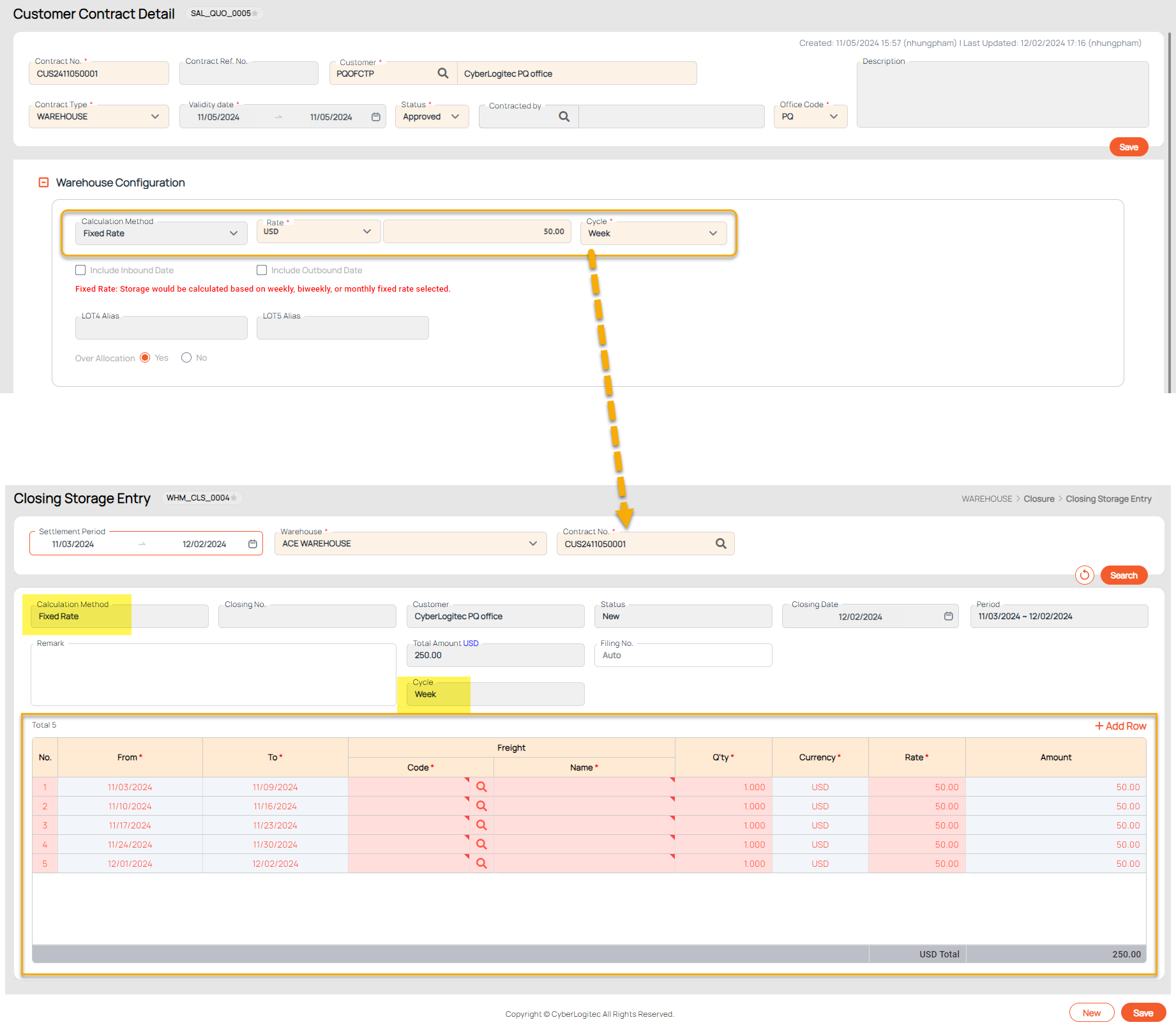
The Fixed Rate Calculation Method in the Closing Storage process applies to contracts where storage charges are predefined and remain constant over specific time intervals. This method simplifies storage fee calculations by organizing charges into predefined cycles (e.g., week, twice a month, month) based on the contract setup.
When using this method:
- The system automatically organizes charges into intervals (e.g., week, twice a month, month) based on the contract's cycle setup.
- The retrieved data in the grid reflects these intervals, allowing users to verify and adjust freight information as needed.
Key Points:
- Contract Setup Requirement: Ensure the contract is configured with the Fixed Rate Calculation Method in the system. This setup is mandatory for the method to function correctly.
- Interval Division: The system divides the selected period into intervals based on the cycle defined in the contract (e.g., week, twice a month, month). Each interval is represented as a row in the grid.
- Predefined Rates: Storage charges are calculated automatically based on the fixed rates defined in the contract, ensuring consistent and predictable billing.
- User Input: Verify and complete fields in the grid (e.g., Freight Code, Qty) for each interval before saving.
Example when retrieve freight:
¶ 2. Daily In & Out Calculation Method
The Daily In & Out calculation method in the Closing Storage Entry UI is used for contracts that require daily storage charge calculations based on item transactions (inbound/ outbound dates). This method retrieves and organizes storage data per date, as defined by the contract and inventory records.
Key Points:
- Ensure that the contract is set up with the Daily In & Out calculation method.
- The system will display items by date, with each date corresponding to the period specified.
- You can modify the entries in the grid to ensure accurate data, including the Freight Code, Rate, and Amount.
- The Total Amount will be automatically calculated based on the rates and quantities entered.
¶ 3. Daily Total Volume Calculation Method
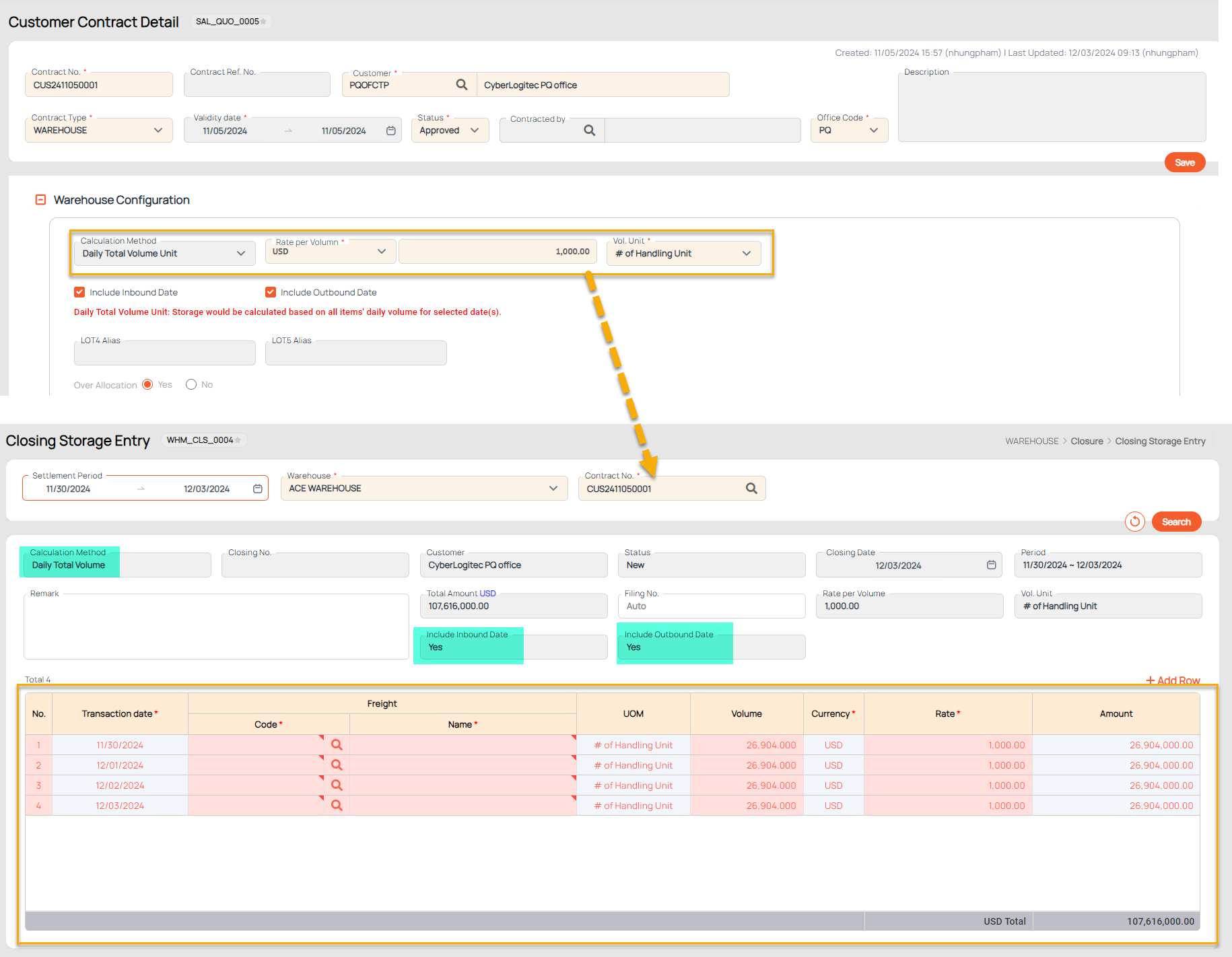
The Daily Total Volume Calculation method calculates storage fees based on the daily volume of goods for selected dates.
Key Points:
- The contract must be set up with the Daily Total Volume Calculation Method.
- Freight charges are calculated based on the total daily volume for each selected date in the period.
- Ensure the retrieved Total Volume and Rate align with the contract setup before saving the closing.
Example when retrieve freight:
¶ 4. Ending Balance Calculation Method
The Ending Balance Calculation Method in the Closing Storage UI is designed to calculate storage fees based on the ending inventory balance of selected items for a specific date.
Key Points:
- Ensure the contract is set up with the Ending Balance Calculation Method.
- Freight data will only retrieve for items existing in the warehouse's inventory during the specified period.
- Verify that the Ending Balance Qty matches the inventory records for accurate billing.
¶ Confirm a Closing
- Confirming a Closing is mandatory before generating an invoice.
- Once confirmed, the data in the closing cannot be modified. However, users can cancel the confirmation by clicking the CFM Cancel button if necessary. After canceling the confirmation, the record can be edited and re-confirmed as required.
- Use the Closing List to track and manage all confirmed closings and generate invoices as needed.
Steps:
- Open the Closing has Saved status
- Click the Confirm button
- After saving successfully: can't edit Closing information, the system will automatically generate Filling No. , the status will be updated to Confirmed and the CFM Cancel button will be shown on the screen.
¶ Cancel the Confirmed Closing
Once a closing record has been confirmed, it becomes locked and cannot be edited. However, if changes are necessary, users can cancel the confirmation using the following steps:
- Open the Closing has Confirmed status
- Click the CFM Cancel button
- After canceling successfully, the status will be updated to Saved, the save and delete buttons will be shown and the cancel button will be hidden.
¶ Delete a Closing
After deleting successfully, can't retrieve this Closing in the system. Please check carefully before deleting.
Steps:
- Open the Closing has Saved status
- Click the Delete button